So, 2nd April 2019, saw the last day of Inbox by Gmail, perhaps Google’s most ambitious project yet (of course, after Google Photos!). I (in fact, everyone who used it), loved the concept of email bundling (and how well Google’s algorithms handled it!), high priority notifications, pinning and snoozing e-mails, saving articles, reminders, and a very colorful and playful UI! (Seriously, I miss the app every single day, there hasn’t been a single app in the market until now which gets close to Inbox….)
Anyways, the reason I gave this background of Inbox is that I’ve found this new ‘Inbox’ of SMS apps, right away coming from Microsoft’s garage (No, seriously! The developers named themselves literally as Microsoft Garage!)— SMS Organizer!
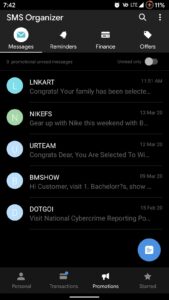
This is how it looks normally
So, coming straight to the point, this is perhaps my best ever SMS experience ever since I’ve stepped into the smartphone world.
The features? – Long list, but let’s break them down…. Here are my favorites
OTP Recognition
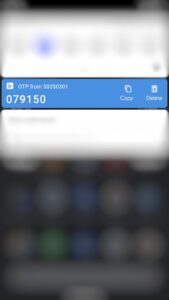
‘Pulse SMS’ introduced this feature (I guess, 1.5 years back), but it was a hit or miss; coming to this app, I don’t know what magic Microsoft has put in here, but the OTP recognizer of the app nails it…each and every time.
So to give a context for those who aren’t aware……when an SMS with an OTP arrives, the app simply throws you the notification with OTP in giant fonts (So your eyes aren’t looking for that 4/6/8-digit code here and there) along with the nifty ‘Copy’ and ‘Delete’ (who wants to keep those OTPs, right?) notification actionable. This feature has seriously spoiled me for good and is perhaps even preventing me from uninstalling this app (will come to it later)
SMS Categorization
So categories are front and center on this app which are as follows:
- Messages – Self explanatory, I suppose
- Personal – messages from / to your contacts / maybe even unknown numbers
- Transactions – Bank alerts, OTPs, Wallet utilization, and related updates
- Promotions – Your usual spam of you winning the lottery, discounts, etc.
- Starred – Similar to Inbox’s pinning feature, all your starred SMSs appear here
- Reminders – for any follow up that might be required on any SMSs (similar to snoozing)
- Oh, one more thing; this section will even track your packages for you, It will detect SMSs of ‘placed orders’ and display dynamic cards where one can track the shipment and copy the tracking numbers
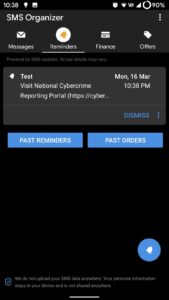
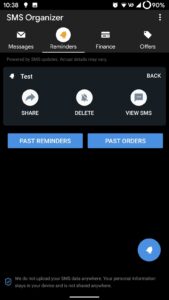
So categories are front and center on this app which are as follows:
- Finance – A separate tab for you to keep track of your Bank accounts, balances, and even prepaid wallets (e.g.: Amazon Pay), basically messages from ‘Transactions’ are systematically presented like a Debit / Credit statement
- Offers – All the promotional messages are clubbed here with good categorization and filters and a nifty ‘Copy Code’ button alongside each offer
Basically, all check-boxes for a good user experience have been ticked-off
Offers
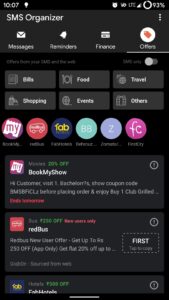
So as mentioned, all the offers messages received are clubbed here, and the app also throws some of its own offers curated from maybe some external links. Also, if enabled, the app even displays a notification when you open some other app, an offer of which you might have received!
Say, you want to book an Uber and hence open the app, SMS organizer will instantly notify that you had received a coupon code earlier which entitled you a 50% off on the next 2 rides (with an actionable to copy the code!). Dope.
Customizations
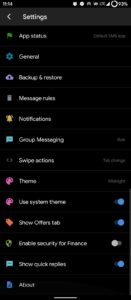
First things first – this app comes with dark mode (Yay!)
By customization, I mean the way one uses the app and not the look and feel.
One can schedule SMSs (so you do not forget to wish your friend on his /her birthday), automatically back them up on Google Drive on defined frequencies, change swiping behaviors (like which portion will scroll when you swipe to switch tabs), setting timelines for auto deleting messages (Boy, this even has a separate option for setting the frequency for OTPs 😆), deep notification channels integration (meaning granular level of control over the notifications you receive).
Last but not the least….the categorization of messages can be changed from one to other, if you feel something’s not right
(I don’t think you will ever use it though, but still it is there)
What I did not like?
I mentioned earlier about ‘preventing from uninstalling’, It’s the design that I do not enjoy much. So, on a personal note, I am a fan of Google’s Material Design and the animations and the way things appear on-screen (the GUI, in short). SMS Organizer does have bottom bars, but the app’s UI really doesn’t have that feel which I look for (Luke Klinker’s Pulse SMS, is the one I enjoy using in terms of UI). I mean look at other apps such as Google Photos, Relay for Reddit, FilterBox, and obviously, Inbox by Gmail (Deprecated). Basically, the Material design guidelines haven’t been fully adhered to and that’s why I want to uninstall the app but can’t because the app’s usefulness has spoiled me.
Microsoft, if you are reading this, the only thing I need is a UI overhaul…
So (sans the above line) as mentioned before, in my opinion, this app is indeed my ‘Inbox’ dream of SMS come true. Looking at you, Google! (¬_¬)
Oh, the most important thing, Here’s the download link:

So, please let me know in the comments section, your thoughts on the app and any SMS apps which y’all are aware of and which are good!
stay aware, stay appy 🙂



0 Comments